`
in `CSV` (dense) and `IJV` (sparse) formats, `DataFrame`, `Matrix`, and
`Frame`. RDDs and JavaRDDs are assumed to be CSV format unless MatrixMetadata is supplied indicating
IJV format.
## RDD Example
Let's take a look at an example of input matrices as RDDs in CSV format. We'll create two 2x2
matrices and input these into a DML script. This script will sum each matrix and create a message
based on which sum is greater. We will output the sums and the message.
For fun, we'll write the script String to a file and then use ScriptFactory's `dmlFromFile` method
(in Python, this method is under the `systemml` package)
to create the script object based on the file. We'll also specify the inputs using a Map, although
we could have also chained together two `in` methods to specify the same inputs.
{% highlight scala %}
val rdd1 = sc.parallelize(Array("1.0,2.0", "3.0,4.0"))
val rdd2 = sc.parallelize(Array("5.0,6.0", "7.0,8.0"))
val sums = """
s1 = sum(m1);
s2 = sum(m2);
if (s1 > s2) {
message = "s1 is greater"
} else if (s2 > s1) {
message = "s2 is greater"
} else {
message = "s1 and s2 are equal"
}
"""
scala.tools.nsc.io.File("sums.dml").writeAll(sums)
val sumScript = dmlFromFile("sums.dml").in(Map("m1"-> rdd1, "m2"-> rdd2)).out("s1", "s2", "message")
val sumResults = ml.execute(sumScript)
val s1 = sumResults.getDouble("s1")
val s2 = sumResults.getDouble("s2")
val message = sumResults.getString("message")
{% endhighlight %}
{% highlight scala %}
scala> val rdd1 = sc.parallelize(Array("1.0,2.0", "3.0,4.0"))
rdd1: org.apache.spark.rdd.RDD[String] = ParallelCollectionRDD[42] at parallelize at :38
scala> val rdd2 = sc.parallelize(Array("5.0,6.0", "7.0,8.0"))
rdd2: org.apache.spark.rdd.RDD[String] = ParallelCollectionRDD[43] at parallelize at :38
scala> val sums = """
| s1 = sum(m1);
| s2 = sum(m2);
| if (s1 > s2) {
| message = "s1 is greater"
| } else if (s2 > s1) {
| message = "s2 is greater"
| } else {
| message = "s1 and s2 are equal"
| }
| """
sums: String =
"
s1 = sum(m1);
s2 = sum(m2);
if (s1 > s2) {
message = "s1 is greater"
} else if (s2 > s1) {
message = "s2 is greater"
} else {
message = "s1 and s2 are equal"
}
"
scala> scala.tools.nsc.io.File("sums.dml").writeAll(sums)
scala> val sumScript = dmlFromFile("sums.dml").in(Map("m1"-> rdd1, "m2"-> rdd2)).out("s1", "s2", "message")
sumScript: org.apache.sysml.api.mlcontext.Script =
Inputs:
[1] (RDD) m1: ParallelCollectionRDD[42] at parallelize at :38
[2] (RDD) m2: ParallelCollectionRDD[43] at parallelize at :38
Outputs:
[1] s1
[2] s2
[3] message
scala> val sumResults = ml.execute(sumScript)
sumResults: org.apache.sysml.api.mlcontext.MLResults =
[1] (Double) s1: 10.0
[2] (Double) s2: 26.0
[3] (String) message: s2 is greater
scala> val s1 = sumResults.getDouble("s1")
s1: Double = 10.0
scala> val s2 = sumResults.getDouble("s2")
s2: Double = 26.0
scala> val message = sumResults.getString("message")
message: String = s2 is greater
{% endhighlight %}
{% highlight python %}
rdd1 = sc.parallelize(["1.0,2.0", "3.0,4.0"])
rdd2 = sc.parallelize(["5.0,6.0", "7.0,8.0"])
sums = """
s1 = sum(m1);
s2 = sum(m2);
if (s1 > s2) {
message = "s1 is greater"
} else if (s2 > s1) {
message = "s2 is greater"
} else {
message = "s1 and s2 are equal"
}
"""
with open("sums.dml", "w") as text_file:
text_file.write(sums)
sumScript = dmlFromFile("sums.dml").input(m1=rdd1, m2= rdd2).output("s1", "s2", "message")
sumResults = ml.execute(sumScript)
s1 = sumResults.get("s1")
s2 = sumResults.get("s2")
message = sumResults.get("message")
{% endhighlight %}
{% highlight python %}
>>> rdd1 = sc.parallelize(["1.0,2.0", "3.0,4.0"])
>>> rdd2 = sc.parallelize(["5.0,6.0", "7.0,8.0"])
>>> sums = """
... s1 = sum(m1);
... s2 = sum(m2);
... if (s1 > s2) {
... message = "s1 is greater"
... } else if (s2 > s1) {
... message = "s2 is greater"
... } else {
... message = "s1 and s2 are equal"
... }
... """
>>> with open("sums.dml", "w") as text_file:
... text_file.write(sums)
...
>>> sumScript = dmlFromFile("sums.dml").input(m1=rdd1, m2= rdd2).output("s1", "s2", "message")
>>> sumResults = ml.execute(sumScript)
s1 = sumResults.get("s1")
s2 = sumResults.get("s2")
message = sumResults.get("message")
SystemML Statistics:
Total execution time: 0.933 sec.
Number of executed Spark inst: 4.
>>> s1 = sumResults.get("s1")
>>> s2 = sumResults.get("s2")
>>> message = sumResults.get("message")
>>> s1
10.0
>>> s2
26.0
>>> message
u's2 is greater'
{% endhighlight %}
If you have metadata that you would like to supply along with the input matrices, this can be
accomplished using a Scala Seq, List, or Array. This feature is currently not available in Python.
{% highlight scala %}
val rdd1Metadata = new MatrixMetadata(2, 2)
val rdd2Metadata = new MatrixMetadata(2, 2)
val sumScript = dmlFromFile("sums.dml").in(Seq(("m1", rdd1, rdd1Metadata), ("m2", rdd2, rdd2Metadata))).out("s1", "s2", "message")
val (firstSum, secondSum, sumMessage) = ml.execute(sumScript).getTuple[Double, Double, String]("s1", "s2", "message")
{% endhighlight %}
{% highlight scala %}
scala> val rdd1Metadata = new MatrixMetadata(2, 2)
rdd1Metadata: org.apache.sysml.api.mlcontext.MatrixMetadata = rows: 2, columns: 2, non-zeros: None, rows per block: None, columns per block: None
scala> val rdd2Metadata = new MatrixMetadata(2, 2)
rdd2Metadata: org.apache.sysml.api.mlcontext.MatrixMetadata = rows: 2, columns: 2, non-zeros: None, rows per block: None, columns per block: None
scala> val sumScript = dmlFromFile("sums.dml").in(Seq(("m1", rdd1, rdd1Metadata), ("m2", rdd2, rdd2Metadata))).out("s1", "s2", "message")
sumScript: org.apache.sysml.api.mlcontext.Script =
Inputs:
[1] (RDD) m1: ParallelCollectionRDD[42] at parallelize at :38
[2] (RDD) m2: ParallelCollectionRDD[43] at parallelize at :38
Outputs:
[1] s1
[2] s2
[3] message
scala> val (firstSum, secondSum, sumMessage) = ml.execute(sumScript).getTuple[Double, Double, String]("s1", "s2", "message")
firstSum: Double = 10.0
secondSum: Double = 26.0
sumMessage: String = s2 is greater
{% endhighlight %}
The same inputs with metadata can be supplied by chaining `in` methods, as in the example below, which shows that `out` methods can also be
chained.
{% highlight scala %}
val sumScript = dmlFromFile("sums.dml").in("m1", rdd1, rdd1Metadata).in("m2", rdd2, rdd2Metadata).out("s1").out("s2").out("message")
val (firstSum, secondSum, sumMessage) = ml.execute(sumScript).getTuple[Double, Double, String]("s1", "s2", "message")
{% endhighlight %}
{% highlight scala %}
scala> val sumScript = dmlFromFile("sums.dml").in("m1", rdd1, rdd1Metadata).in("m2", rdd2, rdd2Metadata).out("s1").out("s2").out("message")
sumScript: org.apache.sysml.api.mlcontext.Script =
Inputs:
[1] (RDD) m1: ParallelCollectionRDD[42] at parallelize at :38
[2] (RDD) m2: ParallelCollectionRDD[43] at parallelize at :38
Outputs:
[1] s1
[2] s2
[3] message
scala> val (firstSum, secondSum, sumMessage) = ml.execute(sumScript).getTuple[Double, Double, String]("s1", "s2", "message")
firstSum: Double = 10.0
secondSum: Double = 26.0
sumMessage: String = s2 is greater
{% endhighlight %}
{% highlight python %}
sumScript = dmlFromFile("sums.dml").input(m1=rdd1).input(m2= rdd2).output("s1").output("s2").output("message")
sumResults = ml.execute(sumScript)
s1, s2, message = sumResults.get("s1", "s2", "message")
{% endhighlight %}
{% highlight python %}
>>> sumScript = dmlFromFile("sums.dml").input(m1=rdd1).input(m2= rdd2).output("s1").output("s2").output("message")
>>> sumResults = ml.execute(sumScript)
SystemML Statistics:
Total execution time: 1.057 sec.
Number of executed Spark inst: 4.
>>> s1, s2, message = sumResults.get("s1", "s2", "message")
>>> s1
10.0
>>> s2
26.0
>>> message
u's2 is greater'
{% endhighlight %}
## Matrix Output
Let's look at an example of reading a matrix out of SystemML. We'll create a DML script
in which we create a 2x2 matrix `m`. We'll set the variable `n` to be the sum of the cells in the matrix.
We create a script object using String `s`, and we set `m` and `n` as the outputs. We execute the script, and in
the results we see we have Matrix `m` and Double `n`. The `n` output variable has a value of `110.0`.
We get Matrix `m` and Double `n` as a Tuple of values `x` and `y`.
In Scala, we then convert Matrix `m` to an RDD of IJV values, an RDD of CSV values, a DataFrame, and a two-dimensional Double Array, and we display
the values in each of these data structures.
In Python, we use the methods `toDF()` and `toNumPy()` to get the matrix as PySpark DataFrame or NumPy array respectively.
{% highlight scala %}
val s =
"""
m = matrix("11 22 33 44", rows=2, cols=2)
n = sum(m)
"""
val scr = dml(s).out("m", "n");
val res = ml.execute(scr)
val (x, y) = res.getTuple[Matrix, Double]("m", "n")
x.toRDDStringIJV.collect.foreach(println)
x.toRDDStringCSV.collect.foreach(println)
x.toDF.collect.foreach(println)
x.to2DDoubleArray
{% endhighlight %}
{% highlight scala %}
scala> val s =
| """
| m = matrix("11 22 33 44", rows=2, cols=2)
| n = sum(m)
| """
s: String =
"
m = matrix("11 22 33 44", rows=2, cols=2)
n = sum(m)
"
scala> val scr = dml(s).out("m", "n");
scr: org.apache.sysml.api.mlcontext.Script =
Inputs:
None
Outputs:
[1] m
[2] n
scala> val res = ml.execute(scr)
res: org.apache.sysml.api.mlcontext.MLResults =
[1] (Matrix) m: Matrix: scratch_space//_p12059_9.31.117.12//_t0/temp26_14, [2 x 2, nnz=4, blocks (1000 x 1000)], binaryblock, dirty
[2] (Double) n: 110.0
scala> val (x, y) = res.getTuple[Matrix, Double]("m", "n")
x: org.apache.sysml.api.mlcontext.Matrix = Matrix: scratch_space//_p12059_9.31.117.12//_t0/temp26_14, [2 x 2, nnz=4, blocks (1000 x 1000)], binaryblock, dirty
y: Double = 110.0
scala> x.toRDDStringIJV.collect.foreach(println)
1 1 11.0
1 2 22.0
2 1 33.0
2 2 44.0
scala> x.toRDDStringCSV.collect.foreach(println)
11.0,22.0
33.0,44.0
scala> x.toDF.collect.foreach(println)
[0.0,11.0,22.0]
[1.0,33.0,44.0]
scala> x.to2DDoubleArray
res10: Array[Array[Double]] = Array(Array(11.0, 22.0), Array(33.0, 44.0))
{% endhighlight %}
{% highlight python %}
s = """
m = matrix("11 22 33 44", rows=2, cols=2)
n = sum(m)
"""
scr = dml(s).output("m", "n");
res = ml.execute(scr)
x, y = res.get("m", "n")
x.toDF().show()
x.toNumPy()
{% endhighlight %}
{% highlight python %}
>>> s = """
... m = matrix("11 22 33 44", rows=2, cols=2)
... n = sum(m)
... """
>>> scr = dml(s).output("m", "n");
>>> res = ml.execute(scr)
SystemML Statistics:
Total execution time: 0.000 sec.
Number of executed Spark inst: 0.
>>> x, y = res.get("m", "n")
>>> x
Matrix
>>> y
110.0
>>> x.toDF().show()
+-------+----+----+
|__INDEX| C1| C2|
+-------+----+----+
| 1.0|11.0|22.0|
| 2.0|33.0|44.0|
+-------+----+----+
>>> x.toNumPy()
array([[ 11., 22.],
[ 33., 44.]])
{% endhighlight %}
## Univariate Statistics on Haberman Data
Our next example will involve Haberman's Survival Data Set in CSV format from the Center for Machine Learning
and Intelligent Systems. We will run the SystemML Univariate Statistics ("Univar-Stats.dml") script on this
data.
We'll pull the data from a URL and convert it to an RDD, `habermanRDD`. Next, we'll create metadata, `habermanMetadata`,
stating that the matrix consists of 306 rows and 4 columns.
As we can see from the comments in the script
[here](https://raw.githubusercontent.com/apache/systemml/master/scripts/algorithms/Univar-Stats.dml), the
script requires a 'TYPES' input matrix that lists the types of the features (1 for scale, 2 for nominal, 3 for
ordinal), so we create a `typesRDD` matrix consisting of 1 row and 4 columns, with corresponding metadata, `typesMetadata`.
Next, we create the DML script object called `uni` using ScriptFactory's `dmlFromUrl` method, specifying the GitHub URL where the
DML script is located. We bind the `habermanRDD` matrix to the `A` variable in `Univar-Stats.dml`, and we bind
the `typesRDD` matrix to the `K` variable. In addition, we supply a `$CONSOLE_OUTPUT` parameter with a Boolean value
of `true`, which indicates that we'd like to output labeled results to the console. We'll explain why we bind to the `A` and `K`
variables in the [Input Variables vs Input Parameters](spark-mlcontext-programming-guide.html#input-variables-vs-input-parameters)
section below.
{% highlight scala %}
val habermanUrl = "http://archive.ics.uci.edu/ml/machine-learning-databases/haberman/haberman.data"
val habermanList = scala.io.Source.fromURL(habermanUrl).mkString.split("\n")
val habermanRDD = sc.parallelize(habermanList)
val habermanMetadata = new MatrixMetadata(306, 4)
val typesRDD = sc.parallelize(Array("1.0,1.0,1.0,2.0"))
val typesMetadata = new MatrixMetadata(1, 4)
val scriptUrl = "https://raw.githubusercontent.com/apache/systemml/master/scripts/algorithms/Univar-Stats.dml"
val uni = dmlFromUrl(scriptUrl).in("A", habermanRDD, habermanMetadata).in("K", typesRDD, typesMetadata).in("$CONSOLE_OUTPUT", true)
ml.execute(uni)
{% endhighlight %}
{% highlight scala %}
scala> val habermanUrl = "http://archive.ics.uci.edu/ml/machine-learning-databases/haberman/haberman.data"
habermanUrl: String = http://archive.ics.uci.edu/ml/machine-learning-databases/haberman/haberman.data
scala> val habermanList = scala.io.Source.fromURL(habermanUrl).mkString.split("\n")
habermanList: Array[String] = Array(30,64,1,1, 30,62,3,1, 30,65,0,1, 31,59,2,1, 31,65,4,1, 33,58,10,1, 33,60,0,1, 34,59,0,2, 34,66,9,2, 34,58,30,1, 34,60,1,1, 34,61,10,1, 34,67,7,1, 34,60,0,1, 35,64,13,1, 35,63,0,1, 36,60,1,1, 36,69,0,1, 37,60,0,1, 37,63,0,1, 37,58,0,1, 37,59,6,1, 37,60,15,1, 37,63,0,1, 38,69,21,2, 38,59,2,1, 38,60,0,1, 38,60,0,1, 38,62,3,1, 38,64,1,1, 38,66,0,1, 38,66,11,1, 38,60,1,1, 38,67,5,1, 39,66,0,2, 39,63,0,1, 39,67,0,1, 39,58,0,1, 39,59,2,1, 39,63,4,1, 40,58,2,1, 40,58,0,1, 40,65,0,1, 41,60,23,2, 41,64,0,2, 41,67,0,2, 41,58,0,1, 41,59,8,1, 41,59,0,1, 41,64,0,1, 41,69,8,1, 41,65,0,1, 41,65,0,1, 42,69,1,2, 42,59,0,2, 42,58,0,1, 42,60,1,1, 42,59,2,1, 42,61,4,1, 42,62,20,1, 42,65,0,1, 42,63,1,1, 43,58,52,2, 43,59,2,2, 43,64,0,2, 43,64,0,2, 43,63,14,1, 43,64,2,1, 43...
scala> val habermanRDD = sc.parallelize(habermanList)
habermanRDD: org.apache.spark.rdd.RDD[String] = ParallelCollectionRDD[159] at parallelize at :43
scala> val habermanMetadata = new MatrixMetadata(306, 4)
habermanMetadata: org.apache.sysml.api.mlcontext.MatrixMetadata = rows: 306, columns: 4, non-zeros: None, rows per block: None, columns per block: None
scala> val typesRDD = sc.parallelize(Array("1.0,1.0,1.0,2.0"))
typesRDD: org.apache.spark.rdd.RDD[String] = ParallelCollectionRDD[160] at parallelize at :39
scala> val typesMetadata = new MatrixMetadata(1, 4)
typesMetadata: org.apache.sysml.api.mlcontext.MatrixMetadata = rows: 1, columns: 4, non-zeros: None, rows per block: None, columns per block: None
scala> val scriptUrl = "https://raw.githubusercontent.com/apache/systemml/master/scripts/algorithms/Univar-Stats.dml"
scriptUrl: String = https://raw.githubusercontent.com/apache/systemml/master/scripts/algorithms/Univar-Stats.dml
scala> val uni = dmlFromUrl(scriptUrl).in("A", habermanRDD, habermanMetadata).in("K", typesRDD, typesMetadata).in("$CONSOLE_OUTPUT", true)
uni: org.apache.sysml.api.mlcontext.Script =
Inputs:
[1] (RDD) A: ParallelCollectionRDD[159] at parallelize at :43
[2] (RDD) K: ParallelCollectionRDD[160] at parallelize at :39
[3] (Boolean) $CONSOLE_OUTPUT: true
Outputs:
None
scala> ml.execute(uni)
...
-------------------------------------------------
Feature [1]: Scale
(01) Minimum | 30.0
(02) Maximum | 83.0
(03) Range | 53.0
(04) Mean | 52.45751633986928
(05) Variance | 116.71458266366658
(06) Std deviation | 10.803452349303281
(07) Std err of mean | 0.6175922641866753
(08) Coeff of variation | 0.20594669940735139
(09) Skewness | 0.1450718616532357
(10) Kurtosis | -0.6150152487211726
(11) Std err of skewness | 0.13934809593495995
(12) Std err of kurtosis | 0.277810485320835
(13) Median | 52.0
(14) Interquartile mean | 52.16013071895425
-------------------------------------------------
Feature [2]: Scale
(01) Minimum | 58.0
(02) Maximum | 69.0
(03) Range | 11.0
(04) Mean | 62.85294117647059
(05) Variance | 10.558630665380907
(06) Std deviation | 3.2494046632238507
(07) Std err of mean | 0.18575610076612029
(08) Coeff of variation | 0.051698529971741194
(09) Skewness | 0.07798443581479181
(10) Kurtosis | -1.1324380182967442
(11) Std err of skewness | 0.13934809593495995
(12) Std err of kurtosis | 0.277810485320835
(13) Median | 63.0
(14) Interquartile mean | 62.80392156862745
-------------------------------------------------
Feature [3]: Scale
(01) Minimum | 0.0
(02) Maximum | 52.0
(03) Range | 52.0
(04) Mean | 4.026143790849673
(05) Variance | 51.691117539912135
(06) Std deviation | 7.189653506248555
(07) Std err of mean | 0.41100513466216837
(08) Coeff of variation | 1.7857418611299172
(09) Skewness | 2.954633471088322
(10) Kurtosis | 11.425776549251449
(11) Std err of skewness | 0.13934809593495995
(12) Std err of kurtosis | 0.277810485320835
(13) Median | 1.0
(14) Interquartile mean | 1.2483660130718954
-------------------------------------------------
Feature [4]: Categorical (Nominal)
(15) Num of categories | 2
(16) Mode | 1
(17) Num of modes | 1
res23: org.apache.sysml.api.mlcontext.MLResults =
None
{% endhighlight %}
{% highlight python %}
habermanUrl = "http://archive.ics.uci.edu/ml/machine-learning-databases/haberman/haberman.data"
import urllib
urllib.urlretrieve(habermanUrl, "haberman.data")
habermanList = [line.rstrip("\n") for line in open("haberman.data")]
habermanRDD = sc.parallelize(habermanList)
typesRDD = sc.parallelize(["1.0,1.0,1.0,2.0"])
scriptUrl = "https://raw.githubusercontent.com/apache/systemml/master/scripts/algorithms/Univar-Stats.dml"
uni = dmlFromUrl(scriptUrl).input(A=habermanRDD, K=typesRDD).input("$CONSOLE_OUTPUT", True)
ml.execute(uni)
{% endhighlight %}
{% highlight python %}
>>> habermanUrl = "http://archive.ics.uci.edu/ml/machine-learning-databases/haberman/haberman.data"
>>> import urllib
>>> urllib.urlretrieve(habermanUrl, "haberman.data")
habermanList = [line.rstrip("\n") for line in open("haberman.data")]
habermanRDD = sc.parallelize(habermanList)
typesRDD = sc.parallelize(["1.0,1.0,1.0,2.0"])
scriptUrl = "https://raw.githubusercontent.com/apache/systemml/master/scripts/algorithms/Univar-Stats.dml"
uni = dmlFromUrl(scriptUrl).input(A=habermanRDD, K=typesRDD).input("$CONSOLE_OUTPUT", True)
ml.execute(uni)('haberman.data', )
>>> habermanList = [line.rstrip("\n") for line in open("haberman.data")]
>>> habermanRDD = sc.parallelize(habermanList)
>>> typesRDD = sc.parallelize(["1.0,1.0,1.0,2.0"])
>>> scriptUrl = "https://raw.githubusercontent.com/apache/systemml/master/scripts/algorithms/Univar-Stats.dml"
>>> uni = dmlFromUrl(scriptUrl).input(A=habermanRDD, K=typesRDD).input("$CONSOLE_OUTPUT", True)
>>> ml.execute(uni)
17/07/22 13:42:57 WARN RewriteRemovePersistentReadWrite: Non-registered persistent write of variable 'baseStats' (line 186).
-------------------------------------------------
(01) Minimum | 30.0
(02) Maximum | 83.0
(03) Range | 53.0
(04) Mean | 52.45751633986928
(05) Variance | 116.71458266366658
(06) Std deviation | 10.803452349303281
(07) Std err of mean | 0.6175922641866753
(08) Coeff of variation | 0.20594669940735139
(09) Skewness | 0.1450718616532357
(10) Kurtosis | -0.6150152487211726
(11) Std err of skewness | 0.13934809593495995
(12) Std err of kurtosis | 0.277810485320835
(13) Median | 52.0
(14) Interquartile mean | 52.16013071895425
Feature [1]: Scale
-------------------------------------------------
(01) Minimum | 58.0
(02) Maximum | 69.0
(03) Range | 11.0
(04) Mean | 62.85294117647059
(05) Variance | 10.558630665380907
(06) Std deviation | 3.2494046632238507
(07) Std err of mean | 0.18575610076612029
(08) Coeff of variation | 0.051698529971741194
(09) Skewness | 0.07798443581479181
(10) Kurtosis | -1.1324380182967442
(11) Std err of skewness | 0.13934809593495995
(12) Std err of kurtosis | 0.277810485320835
(13) Median | 63.0
(14) Interquartile mean | 62.80392156862745
Feature [2]: Scale
-------------------------------------------------
(01) Minimum | 0.0
(02) Maximum | 52.0
(03) Range | 52.0
(04) Mean | 4.026143790849673
(05) Variance | 51.691117539912135
(06) Std deviation | 7.189653506248555
(07) Std err of mean | 0.41100513466216837
(08) Coeff of variation | 1.7857418611299172
(09) Skewness | 2.954633471088322
(10) Kurtosis | 11.425776549251449
(11) Std err of skewness | 0.13934809593495995
(12) Std err of kurtosis | 0.277810485320835
(13) Median | 1.0
(14) Interquartile mean | 1.2483660130718954
Feature [3]: Scale
-------------------------------------------------
Feature [4]: Categorical (Nominal)
(15) Num of categories | 2
(16) Mode | 1
(17) Num of modes | 1
SystemML Statistics:
Total execution time: 0.733 sec.
Number of executed Spark inst: 4.
MLResults
>>>
{% endhighlight %}
Alternatively, we could supply a `java.net.URL` to the Script `in` method. Note that if the URL matrix data is in IJV
format, metadata needs to be supplied for the matrix. This feature is not available in Python.
{% highlight scala %}
val habermanUrl = "http://archive.ics.uci.edu/ml/machine-learning-databases/haberman/haberman.data"
val typesRDD = sc.parallelize(Array("1.0,1.0,1.0,2.0"))
val scriptUrl = "https://raw.githubusercontent.com/apache/systemml/master/scripts/algorithms/Univar-Stats.dml"
val uni = dmlFromUrl(scriptUrl).in("A", new java.net.URL(habermanUrl)).in("K", typesRDD).in("$CONSOLE_OUTPUT", true)
ml.execute(uni)
{% endhighlight %}
{% highlight scala %}
scala> val habermanUrl = "http://archive.ics.uci.edu/ml/machine-learning-databases/haberman/haberman.data"
habermanUrl: String = http://archive.ics.uci.edu/ml/machine-learning-databases/haberman/haberman.data
scala> val typesRDD = sc.parallelize(Array("1.0,1.0,1.0,2.0"))
typesRDD: org.apache.spark.rdd.RDD[String] = ParallelCollectionRDD[50] at parallelize at :33
scala> val scriptUrl = "https://raw.githubusercontent.com/apache/systemml/master/scripts/algorithms/Univar-Stats.dml"
scriptUrl: String = https://raw.githubusercontent.com/apache/systemml/master/scripts/algorithms/Univar-Stats.dml
scala> val uni = dmlFromUrl(scriptUrl).in("A", new java.net.URL(habermanUrl)).in("K", typesRDD).in("$CONSOLE_OUTPUT", true)
uni: org.apache.sysml.api.mlcontext.Script =
Inputs:
[1] (URL) A: http://archive.ics.uci.edu/ml/machine-learning-databases/haberman/haberman.data
[2] (RDD) K: ParallelCollectionRDD[50] at parallelize at :33
[3] (Boolean) $CONSOLE_OUTPUT: true
Outputs:
None
scala> ml.execute(uni)
...
-------------------------------------------------
(01) Minimum | 30.0
(02) Maximum | 83.0
(03) Range | 53.0
(04) Mean | 52.45751633986928
(05) Variance | 116.71458266366658
(06) Std deviation | 10.803452349303281
(07) Std err of mean | 0.6175922641866753
(08) Coeff of variation | 0.20594669940735139
(09) Skewness | 0.1450718616532357
(10) Kurtosis | -0.6150152487211726
(11) Std err of skewness | 0.13934809593495995
(12) Std err of kurtosis | 0.277810485320835
(13) Median | 52.0
(14) Interquartile mean | 52.16013071895425
Feature [1]: Scale
-------------------------------------------------
(01) Minimum | 58.0
(02) Maximum | 69.0
(03) Range | 11.0
(04) Mean | 62.85294117647059
(05) Variance | 10.558630665380907
(06) Std deviation | 3.2494046632238507
(07) Std err of mean | 0.18575610076612029
(08) Coeff of variation | 0.051698529971741194
(09) Skewness | 0.07798443581479181
(10) Kurtosis | -1.1324380182967442
(11) Std err of skewness | 0.13934809593495995
(12) Std err of kurtosis | 0.277810485320835
(13) Median | 63.0
(14) Interquartile mean | 62.80392156862745
Feature [2]: Scale
-------------------------------------------------
(01) Minimum | 0.0
(02) Maximum | 52.0
(03) Range | 52.0
(04) Mean | 4.026143790849673
(05) Variance | 51.691117539912135
(06) Std deviation | 7.189653506248555
(07) Std err of mean | 0.41100513466216837
(08) Coeff of variation | 1.7857418611299172
(09) Skewness | 2.954633471088322
(10) Kurtosis | 11.425776549251449
(11) Std err of skewness | 0.13934809593495995
(12) Std err of kurtosis | 0.277810485320835
(13) Median | 1.0
(14) Interquartile mean | 1.2483660130718954
Feature [3]: Scale
-------------------------------------------------
Feature [4]: Categorical (Nominal)
(15) Num of categories | 2
(16) Mode | 1
(17) Num of modes | 1
res5: org.apache.sysml.api.mlcontext.MLResults =
None
{% endhighlight %}
As another example, we can also conveniently obtain a Univariate Statistics DML Script object
via `ml.scripts.algorithms.Univar_Stats`, as shown below. This feature is not available in Python.
{% highlight scala %}
val habermanUrl = "http://archive.ics.uci.edu/ml/machine-learning-databases/haberman/haberman.data"
val typesRDD = sc.parallelize(Array("1.0,1.0,1.0,2.0"))
val scriptUrl = "https://raw.githubusercontent.com/apache/systemml/master/scripts/algorithms/Univar-Stats.dml"
ml.scripts.algorithms.Univar_Stats.in("A", new java.net.URL(habermanUrl)).in("K", typesRDD).in("$CONSOLE_OUTPUT", true).execute
{% endhighlight %}
{% highlight scala %}
scala> val habermanUrl = "http://archive.ics.uci.edu/ml/machine-learning-databases/haberman/haberman.data"
habermanUrl: String = http://archive.ics.uci.edu/ml/machine-learning-databases/haberman/haberman.data
scala> val typesRDD = sc.parallelize(Array("1.0,1.0,1.0,2.0"))
typesRDD: org.apache.spark.rdd.RDD[String] = ParallelCollectionRDD[21] at parallelize at :30
scala> val scriptUrl = "https://raw.githubusercontent.com/apache/systemml/master/scripts/algorithms/Univar-Stats.dml"
scriptUrl: String = https://raw.githubusercontent.com/apache/systemml/master/scripts/algorithms/Univar-Stats.dml
scala> ml.scripts.algorithms.Univar_Stats.in("A", new java.net.URL(habermanUrl)).in("K", typesRDD).in("$CONSOLE_OUTPUT", true).execute
17/06/05 17:23:37 WARN RewriteRemovePersistentReadWrite: Non-registered persistent write of variable 'baseStats' (line 186).
-------------------------------------------------
(01) Minimum | 30.0
(02) Maximum | 83.0
(03) Range | 53.0
(04) Mean | 52.45751633986928
(05) Variance | 116.71458266366658
(06) Std deviation | 10.803452349303281
(07) Std err of mean | 0.6175922641866753
(08) Coeff of variation | 0.20594669940735139
(09) Skewness | 0.1450718616532357
(10) Kurtosis | -0.6150152487211726
(11) Std err of skewness | 0.13934809593495995
(12) Std err of kurtosis | 0.277810485320835
(13) Median | 52.0
(14) Interquartile mean | 52.16013071895425
Feature [1]: Scale
-------------------------------------------------
(01) Minimum | 58.0
(02) Maximum | 69.0
(03) Range | 11.0
(04) Mean | 62.85294117647059
(05) Variance | 10.558630665380907
(06) Std deviation | 3.2494046632238507
(07) Std err of mean | 0.18575610076612029
(08) Coeff of variation | 0.051698529971741194
(09) Skewness | 0.07798443581479181
(10) Kurtosis | -1.1324380182967442
(11) Std err of skewness | 0.13934809593495995
(12) Std err of kurtosis | 0.277810485320835
(13) Median | 63.0
(14) Interquartile mean | 62.80392156862745
Feature [2]: Scale
-------------------------------------------------
(01) Minimum | 0.0
(02) Maximum | 52.0
(03) Range | 52.0
(04) Mean | 4.026143790849673
(05) Variance | 51.691117539912135
(06) Std deviation | 7.189653506248555
(07) Std err of mean | 0.41100513466216837
(08) Coeff of variation | 1.7857418611299172
(09) Skewness | 2.954633471088322
(10) Kurtosis | 11.425776549251449
(11) Std err of skewness | 0.13934809593495995
(12) Std err of kurtosis | 0.277810485320835
(13) Median | 1.0
(14) Interquartile mean | 1.2483660130718954
Feature [3]: Scale
-------------------------------------------------
Feature [4]: Categorical (Nominal)
(15) Num of categories | 2
(16) Mode | 1
(17) Num of modes | 1
SystemML Statistics:
Total execution time: 0.211 sec.
Number of executed Spark inst: 8.
res1: org.apache.sysml.api.mlcontext.MLResults =
None
{% endhighlight %}
### Input Variables vs Input Parameters
If we examine the
[`Univar-Stats.dml`](https://raw.githubusercontent.com/apache/systemml/master/scripts/algorithms/Univar-Stats.dml)
file, we see in the comments that it can take 4 input
parameters, `$X`, `$TYPES`, `$CONSOLE_OUTPUT`, and `$STATS`. Input parameters are typically useful when
executing SystemML in Standalone mode, Spark batch mode, or Hadoop batch mode. For example, `$X` specifies
the location in the file system where the input data matrix is located, `$TYPES` specifies the location in the file system
where the input types matrix is located, `$CONSOLE_OUTPUT` specifies whether or not labeled statistics should be
output to the console, and `$STATS` specifies the location in the file system where the output matrix should be written.
{% highlight r %}
...
# INPUT PARAMETERS:
# -------------------------------------------------------------------------------------------------
# NAME TYPE DEFAULT MEANING
# -------------------------------------------------------------------------------------------------
# X String --- Location of INPUT data matrix
# TYPES String --- Location of INPUT matrix that lists the types of the features:
# 1 for scale, 2 for nominal, 3 for ordinal
# CONSOLE_OUTPUT Boolean FALSE If TRUE, print summary statistics to console
# STATS String --- Location of OUTPUT matrix with summary statistics computed for
# all features (17 statistics - 14 scale, 3 categorical)
# -------------------------------------------------------------------------------------------------
# OUTPUT: Matrix of summary statistics
...
consoleOutput = ifdef($CONSOLE_OUTPUT, FALSE);
A = read($X); # data file
K = read($TYPES); # attribute kind file
...
write(baseStats, $STATS);
...
{% endhighlight %}
Because MLContext is a programmatic interface, it offers more flexibility. You can still use input parameters
and files in the file system, such as this example that specifies file paths to the input matrices and the output matrix:
{% highlight scala %}
val script = dmlFromFile("scripts/algorithms/Univar-Stats.dml").in("$X", "data/haberman.data").in("$TYPES", "data/types.csv").in("$STATS", "data/univarOut.mtx").in("$CONSOLE_OUTPUT", true)
ml.execute(script)
{% endhighlight %}
Using the MLContext API, rather than relying solely on input parameters, we can bind to the variables associated
with the `read` and `write` statements. In the fragment of `Univar-Stats.dml` above, notice that the matrix at
path `$X` is read to variable `A`, `$TYPES` is read to variable
`K`, and `baseStats` is written to path `$STATS`. Therefore, we can bind the Haberman input data matrix to the `A` variable,
the input types matrix to the `K` variable, and the output matrix to the `baseStats` variable.
{% highlight scala %}
val uni = dmlFromUrl(scriptUrl).in("A", habermanRDD, habermanMetadata).in("K", typesRDD, typesMetadata).out("baseStats")
val baseStats = ml.execute(uni).getMatrix("baseStats")
baseStats.toRDDStringIJV.collect.slice(0,9).foreach(println)
{% endhighlight %}
{% highlight scala %}
scala> val uni = dmlFromUrl(scriptUrl).in("A", habermanRDD, habermanMetadata).in("K", typesRDD, typesMetadata).out("baseStats")
uni: org.apache.sysml.api.mlcontext.Script =
Inputs:
[1] (RDD) A: ParallelCollectionRDD[159] at parallelize at :43
[2] (RDD) K: ParallelCollectionRDD[160] at parallelize at :39
Outputs:
[1] baseStats
scala> val baseStats = ml.execute(uni).getMatrix("baseStats")
...
baseStats: org.apache.sysml.api.mlcontext.Matrix = Matrix: scratch_space/_p12059_9.31.117.12/parfor/4_resultmerge1, [17 x 4, nnz=44, blocks (1000 x 1000)], binaryblock, dirty
scala> baseStats.toRDDStringIJV.collect.slice(0,9).foreach(println)
1 1 30.0
1 2 58.0
1 3 0.0
1 4 0.0
2 1 83.0
2 2 69.0
2 3 52.0
2 4 0.0
3 1 53.0
{% endhighlight %}
{% highlight python %}
uni = dmlFromUrl(scriptUrl).input(A=habermanRDD, K=typesRDD).output("baseStats")
baseStats = ml.execute(uni).get("baseStats")
baseStats.toNumPy().flatten()[0:9]
{% endhighlight %}
{% highlight python %}
>>> uni = dmlFromUrl(scriptUrl).input(A=habermanRDD, K=typesRDD).output("baseStats")
>>> baseStats = ml.execute(uni).get("baseStats")
SystemML Statistics:
Total execution time: 0.690 sec.
Number of executed Spark inst: 4.
>>> baseStats.toNumPy().flatten()[0:9]
array([ 30., 58., 0., 0., 83., 69., 52., 0., 53.])
{% endhighlight %}
## Script Information
The `info` method on a Script object can provide useful information about a DML or PyDML script, such as
the inputs, output, symbol table, script string, and the script execution string that is passed to the internals of
SystemML.
{% highlight scala %}
val minMaxMean =
"""
minOut = min(Xin)
maxOut = max(Xin)
meanOut = mean(Xin)
"""
val minMaxMeanScript = dml(minMaxMean).in("Xin", df, mm).out("minOut", "maxOut", "meanOut")
val (min, max, mean) = ml.execute(minMaxMeanScript).getTuple[Double, Double, Double]("minOut", "maxOut", "meanOut")
println(minMaxMeanScript.info)
{% endhighlight %}
{% highlight scala %}
scala> val minMaxMean =
| """
| minOut = min(Xin)
| maxOut = max(Xin)
| meanOut = mean(Xin)
| """
minMaxMean: String =
"
minOut = min(Xin)
maxOut = max(Xin)
meanOut = mean(Xin)
"
scala> val minMaxMeanScript = dml(minMaxMean).in("Xin", df, mm).out("minOut", "maxOut", "meanOut")
minMaxMeanScript: org.apache.sysml.api.mlcontext.Script =
Inputs:
[1] (DataFrame) Xin: [C0: double, C1: double, C2: double, C3: double, C4: double, C5: double, C6: double, C7: double, ...
Outputs:
[1] minOut
[2] maxOut
[3] meanOut
scala> val (min, max, mean) = ml.execute(minMaxMeanScript).getTuple[Double, Double, Double]("minOut", "maxOut", "meanOut")
min: Double = 1.4149740823476975E-7
max: Double = 0.9999999956646207
mean: Double = 0.5000954668004209
scala> println(minMaxMeanScript.info)
Script Type: DML
Inputs:
[1] (DataFrame) Xin: [C0: double, C1: double, C2: double, C3: double, C4: double, C5: double, C6: double, C7: double, ...
Outputs:
[1] (Double) minOut: 1.4149740823476975E-7
[2] (Double) maxOut: 0.9999999956646207
[3] (Double) meanOut: 0.5000954668004209
Input Parameters:
None
Input Variables:
[1] Xin
Output Variables:
[1] minOut
[2] maxOut
[3] meanOut
Symbol Table:
[1] (Double) meanOut: 0.5000954668004209
[2] (Double) maxOut: 0.9999999956646207
[3] (Double) minOut: 1.4149740823476975E-7
[4] (Matrix) Xin: Matrix: scratch_space/temp_1166464711339222, [10000 x 100, nnz=1000000, blocks (1000 x 1000)], binaryblock, not-dirty
Script String:
minOut = min(Xin)
maxOut = max(Xin)
meanOut = mean(Xin)
Script Execution String:
Xin = read('');
minOut = min(Xin)
maxOut = max(Xin)
meanOut = mean(Xin)
write(minOut, '');
write(maxOut, '');
write(meanOut, '');
{% endhighlight %}
{% highlight python %}
minMaxMean = """
minOut = min(Xin)
maxOut = max(Xin)
meanOut = mean(Xin)
"""
minMaxMeanScript = dml(minMaxMean).input(Xin = df).output("minOut", "maxOut", "meanOut")
min, max, mean = ml.execute(minMaxMeanScript).get("minOut", "maxOut", "meanOut")
print(minMaxMeanScript.info())
{% endhighlight %}
{% highlight python %}
>>> minMaxMean = """
... minOut = min(Xin)
... maxOut = max(Xin)
... meanOut = mean(Xin)
... """
>>> minMaxMeanScript = dml(minMaxMean).input(Xin = df).output("minOut", "maxOut", "meanOut")
min, max, mean = ml.execute(minMaxMeanScript).get("minOut", "maxOut", "meanOut")
print(minMaxMeanScript.info())>>> min, max, mean = ml.execute(minMaxMeanScript).get("minOut", "maxOut", "meanOut")
SystemML Statistics:
Total execution time: 0.521 sec.
Number of executed Spark inst: 0.
>>> print(minMaxMeanScript.info())
Script Type: DML
Inputs:
[1] (Dataset as Matrix) Xin: [C0: double, C1: double ... 98 more fields]
Outputs:
[1] (Double) minOut: 8.754858571102808E-6
[2] (Double) maxOut: 0.9999878908225835
[3] (Double) meanOut: 0.49864912369337505
Input Parameters:
None
Input Variables:
[1] Xin
Output Variables:
[1] minOut
[2] maxOut
[3] meanOut
Symbol Table:
[1] (Double) meanOut: 0.49864912369337505
[2] (Double) maxOut: 0.9999878908225835
[3] (Double) minOut: 8.754858571102808E-6
[4] (Matrix) Xin: MatrixObject: scratch_space/_p20299_10.168.31.110/_t0/temp283, [10000 x 100, nnz=1000000, blocks (1000 x 1000)], binaryblock, not-dirty
Script String:
minOut = min(Xin)
maxOut = max(Xin)
meanOut = mean(Xin)
Script Execution String:
Xin = read('');
minOut = min(Xin)
maxOut = max(Xin)
meanOut = mean(Xin)
write(minOut, '');
write(maxOut, '');
write(meanOut, '');
>>>
{% endhighlight %}
## Clearing Scripts and MLContext
Dealing with large matrices can require a significant amount of memory. To deal help deal with this, you
can call a Script object's `clearAll` method to clear the inputs, outputs, symbol table, and script string.
In terms of memory, the symbol table is most important because it holds references to matrices.
In this example, we display the symbol table of the `minMaxMeanScript`, call `clearAll` on the script, and
then display the symbol table, which is empty.
{% highlight scala %}
println(minMaxMeanScript.displaySymbolTable)
minMaxMeanScript.clearAll
println(minMaxMeanScript.displaySymbolTable)
{% endhighlight %}
{% highlight scala %}
scala> println(minMaxMeanScript.displaySymbolTable)
Symbol Table:
[1] (Double) meanOut: 0.5000954668004209
[2] (Double) maxOut: 0.9999999956646207
[3] (Double) minOut: 1.4149740823476975E-7
[4] (Matrix) Xin: Matrix: scratch_space/temp_1166464711339222, [10000 x 100, nnz=1000000, blocks (1000 x 1000)], binaryblock, not-dirty
scala> minMaxMeanScript.clearAll
scala> println(minMaxMeanScript.displaySymbolTable)
Symbol Table:
None
{% endhighlight %}
{% highlight python %}
print(minMaxMeanScript.displaySymbolTable())
minMaxMeanScript.clearAll()
print(minMaxMeanScript.displaySymbolTable())
{% endhighlight %}
{% highlight python %}
>>> print(minMaxMeanScript.displaySymbolTable())
Symbol Table:
[1] (Double) meanOut: 0.49825964615525964
[2] (Double) maxOut: 0.9999420388455621
[3] (Double) minOut: 2.177681068027404E-5
[4] (Matrix) Xin: MatrixObject: scratch_space/_p30346_10.168.31.110/_t0/temp0, [10000 x 100, nnz=1000000, blocks (1000 x 1000)], binaryblock, not-dirty
>>> minMaxMeanScript.clearAll()
Script
>>> print(minMaxMeanScript.displaySymbolTable())
Symbol Table:
None
>>>
{% endhighlight %}
The MLContext object holds references to the scripts that have been executed. Calling `clear` on
the MLContext clears all scripts that it has references to and then removes the references to these
scripts.
{% highlight scala %}
ml.clear
{% endhighlight %}
## Statistics
Statistics about script executions can be output to the console by calling MLContext's `setStatistics`
method with a value of `true`.
{% highlight scala %}
ml.setStatistics(true)
val minMaxMean =
"""
minOut = min(Xin)
maxOut = max(Xin)
meanOut = mean(Xin)
"""
val minMaxMeanScript = dml(minMaxMean).in("Xin", df, mm).out("minOut", "maxOut", "meanOut")
val (min, max, mean) = ml.execute(minMaxMeanScript).getTuple[Double, Double, Double]("minOut", "maxOut", "meanOut")
{% endhighlight %}
{% highlight scala %}
scala> ml.setStatistics(true)
scala> val minMaxMean =
| """
| minOut = min(Xin)
| maxOut = max(Xin)
| meanOut = mean(Xin)
| """
minMaxMean: String =
"
minOut = min(Xin)
maxOut = max(Xin)
meanOut = mean(Xin)
"
scala> val minMaxMeanScript = dml(minMaxMean).in("Xin", df, mm).out("minOut", "maxOut", "meanOut")
minMaxMeanScript: org.apache.sysml.api.mlcontext.Script =
Inputs:
[1] (DataFrame) Xin: [C0: double, C1: double, C2: double, C3: double, C4: double, C5: double, C6: double, C7: double, ...
Outputs:
[1] minOut
[2] maxOut
[3] meanOut
scala> val (min, max, mean) = ml.execute(minMaxMeanScript).getTuple[Double, Double, Double]("minOut", "maxOut", "meanOut")
SystemML Statistics:
Total elapsed time: 0.000 sec.
Total compilation time: 0.000 sec.
Total execution time: 0.000 sec.
Number of compiled Spark inst: 0.
Number of executed Spark inst: 0.
Cache hits (Mem, WB, FS, HDFS): 2/0/0/1.
Cache writes (WB, FS, HDFS): 1/0/0.
Cache times (ACQr/m, RLS, EXP): 3.137/0.000/0.001/0.000 sec.
HOP DAGs recompiled (PRED, SB): 0/0.
HOP DAGs recompile time: 0.000 sec.
Spark ctx create time (lazy): 0.000 sec.
Spark trans counts (par,bc,col):0/0/2.
Spark trans times (par,bc,col): 0.000/0.000/6.434 secs.
Total JIT compile time: 112.372 sec.
Total JVM GC count: 54.
Total JVM GC time: 9.664 sec.
Heavy hitter instructions (name, time, count):
-- 1) uamin 3.150 sec 1
-- 2) uamean 0.021 sec 1
-- 3) uamax 0.017 sec 1
-- 4) rmvar 0.000 sec 3
-- 5) assignvar 0.000 sec 3
min: Double = 2.4982850344024143E-8
max: Double = 0.9999997007231808
mean: Double = 0.5002109404821844
{% endhighlight %}
{% highlight python %}
ml.setStatistics(True)
minMaxMean = """
minOut = min(Xin)
maxOut = max(Xin)
meanOut = mean(Xin)
"""
minMaxMeanScript = dml(minMaxMean).input(Xin=df).output("minOut", "maxOut", "meanOut")
min, max, mean = ml.execute(minMaxMeanScript).get("minOut", "maxOut", "meanOut")
{% endhighlight %}
{% highlight python %}
>>> ml.setStatistics(True)
MLContext
>>> minMaxMean = """
... minOut = min(Xin)
... maxOut = max(Xin)
... meanOut = mean(Xin)
... """
>>> minMaxMeanScript = dml(minMaxMean).input(Xin=df).output("minOut", "maxOut", "meanOut")
>>> min, max, mean = ml.execute(minMaxMeanScript).get("minOut", "maxOut", "meanOut")
SystemML Statistics:
Total elapsed time: 0.608 sec.
Total compilation time: 0.000 sec.
Total execution time: 0.608 sec.
Number of compiled Spark inst: 0.
Number of executed Spark inst: 0.
Cache hits (Mem, WB, FS, HDFS): 2/0/0/1.
Cache writes (WB, FS, HDFS): 1/0/0.
Cache times (ACQr/m, RLS, EXP): 0.586/0.000/0.000/0.000 sec.
HOP DAGs recompiled (PRED, SB): 0/0.
HOP DAGs recompile time: 0.000 sec.
Spark ctx create time (lazy): 0.000 sec.
Spark trans counts (par,bc,col):0/0/1.
Spark trans times (par,bc,col): 0.000/0.000/0.586 secs.
Total JIT compile time: 1.289 sec.
Total JVM GC count: 17.
Total JVM GC time: 0.4 sec.
Heavy hitter instructions:
# Instruction Time(s) Count
1 uamin 0.588 1
2 uamean 0.018 1
3 uamax 0.002 1
4 assignvar 0.000 3
5 rmvar 0.000 1
>>>
{% endhighlight %}
## GPU
If the driver node has a GPU, SystemML may be able to utilize it, subject to memory constraints and what instructions are used in the dml script
{% highlight scala %}
ml.setGPU(true)
ml.setStatistics(true)
val matMultScript = dml("""
A = rand(rows=10, cols=1000)
B = rand(rows=1000, cols=10)
C = A %*% B
print(toString(C))
""")
ml.execute(matMultScript)
{% endhighlight %}
{% highlight scala %}
scala> ml.setGPU(true)
scala> ml.setStatistics(true)
scala> val matMultScript = dml("""
| A = rand(rows=10, cols=1000)
| B = rand(rows=1000, cols=10)
| C = A %*% B
| print(toString(C))
| """)
matMultScript: org.apache.sysml.api.mlcontext.Script =
Inputs:
None
Outputs:
None
scala> ml.execute(matMultScript)
249.977 238.545 233.700 234.489 248.556 244.423 249.051 255.043 249.117 251.605
249.226 248.680 245.532 238.258 254.451 249.827 260.957 251.273 250.577 257.571
258.703 246.969 243.463 246.547 250.784 251.758 251.654 258.318 251.817 254.097
248.788 242.960 230.920 244.026 249.159 247.998 251.330 254.718 248.013 255.706
253.251 248.788 235.785 242.941 252.096 248.675 256.865 251.677 252.872 250.490
256.087 245.035 234.124 238.307 248.630 252.522 251.122 251.577 249.171 247.974
245.419 243.114 232.262 239.776 249.583 242.351 250.972 249.244 246.729 251.807
250.081 242.367 230.334 240.955 248.332 240.730 246.940 250.396 244.107 249.729
247.368 239.882 234.353 237.087 252.337 248.801 246.627 249.077 244.305 245.621
252.827 257.352 239.546 246.529 258.916 255.612 260.480 254.805 252.695 257.531
SystemML Statistics:
Total elapsed time: 0.000 sec.
Total compilation time: 0.000 sec.
Total execution time: 0.000 sec.
Number of compiled Spark inst: 0.
Number of executed Spark inst: 0.
CUDA/CuLibraries init time: 0.000/0.003 sec.
Number of executed GPU inst: 8.
GPU mem tx time (alloc/dealloc/toDev/fromDev): 0.003/0.002/0.010/0.002 sec.
GPU mem tx count (alloc/dealloc/toDev/fromDev/evict): 24/24/0/16/8/0.
GPU conversion time (sparseConv/sp2dense/dense2sp): 0.000/0.000/0.000 sec.
GPU conversion count (sparseConv/sp2dense/dense2sp): 0/0/0.
Cache hits (Mem, WB, FS, HDFS): 40/0/0/0.
Cache writes (WB, FS, HDFS): 21/0/0.
Cache times (ACQr/m, RLS, EXP): 0.002/0.002/0.003/0.000 sec.
HOP DAGs recompiled (PRED, SB): 0/0.
HOP DAGs recompile time: 0.000 sec.
Spark ctx create time (lazy): 0.000 sec.
Spark trans counts (par,bc,col):0/0/0.
Spark trans times (par,bc,col): 0.000/0.000/0.000 secs.
Total JIT compile time: 11.426 sec.
Total JVM GC count: 20.
Total JVM GC time: 1.078 sec.
Heavy hitter instructions (name, time, count):
-- 1) toString 0.085 sec 8
-- 2) rand 0.027 sec 16
-- 3) gpu_ba+* 0.018 sec 8
-- 4) print 0.006 sec 8
-- 5) createvar 0.003 sec 24
-- 6) rmvar 0.003 sec 40
res20: org.apache.sysml.api.mlcontext.MLResults =
None
{% endhighlight %}
{% highlight python %}
ml.setGPU(True)
ml.setStatistics(True)
matMultScript = dml("""
A = rand(rows=10, cols=1000)
B = rand(rows=1000, cols=10)
C = A %*% B
print(toString(C))
""")
ml.execute(matMultScript)
{% endhighlight %}
{% highlight python %}
>>> ml.setGPU(True)
MLContext
>>> ml.setStatistics(True)
MLContext
>>> matMultScript = dml("""
... A = rand(rows=10, cols=1000)
... B = rand(rows=1000, cols=10)
... C = A %*% B
... print(toString(C))
... """)
>>> ml.execute(matMultScript)
260.861 262.732 256.630 255.152 254.806 264.448 256.020 250.240 257.520 261.278
257.171 254.891 251.777 246.858 248.947 255.528 247.446 244.370 252.597 253.466
259.844 255.613 257.720 253.652 249.693 261.110 252.608 250.833 251.968 259.176
254.491 247.792 252.551 246.869 244.682 254.734 247.387 244.323 245.981 255.621
259.835 258.062 255.868 252.217 246.304 263.997 255.831 249.846 248.409 260.124
251.598 259.335 255.662 249.818 247.639 257.279 253.946 253.513 251.245 255.922
258.898 258.961 264.036 249.118 250.780 259.547 249.149 258.040 249.100 258.516
250.412 248.424 250.732 243.129 241.684 248.771 237.941 244.719 247.409 247.445
252.990 244.238 248.096 241.145 242.065 253.795 245.352 246.056 251.132 253.063
253.216 249.008 247.910 246.579 242.657 251.078 245.954 244.681 241.878 248.555
SystemML Statistics:
Total elapsed time: 0.042 sec.
Total compilation time: 0.000 sec.
Total execution time: 0.042 sec.
Number of compiled Spark inst: 0.
Number of executed Spark inst: 0.
CUDA/CuLibraries init time: 7.058/0.749 sec.
Number of executed GPU inst: 1.
GPU mem tx time (alloc/dealloc/set0/toDev/fromDev): 0.002/0.000/0.000/0.002/0.000 sec.
GPU mem tx count (alloc/dealloc/set0/toDev/fromDev/evict): 3/3/3/0/2/1/0.
GPU conversion time (sparseConv/sp2dense/dense2sp): 0.000/0.000/0.000 sec.
GPU conversion count (sparseConv/sp2dense/dense2sp): 0/0/0.
Cache hits (Mem, WB, FS, HDFS): 3/0/0/0.
Cache writes (WB, FS, HDFS): 2/0/0.
Cache times (ACQr/m, RLS, EXP): 0.000/0.000/0.000/0.000 sec.
HOP DAGs recompiled (PRED, SB): 0/0.
HOP DAGs recompile time: 0.000 sec.
Spark ctx create time (lazy): 0.000 sec.
Spark trans counts (par,bc,col):0/0/0.
Spark trans times (par,bc,col): 0.000/0.000/0.000 secs.
Total JIT compile time: 1.348 sec.
Total JVM GC count: 9.
Total JVM GC time: 0.264 sec.
Heavy hitter instructions:
# Instruction Time(s) Count
1 rand 0.023 2
2 gpu_ba+* 0.012 1
3 toString 0.004 1
4 createvar 0.000 3
5 rmvar 0.000 3
6 print 0.000 1
18
MLResults
>>>
{% endhighlight %}
Note that GPU instructions show up prepended with a "gpu" in the statistics.
## Explain
A DML or PyDML script is converted into a SystemML program during script execution. Information
about this program can be displayed by calling MLContext's `setExplain` method with a value
of `true`.
{% highlight scala %}
ml.setExplain(true)
val minMaxMean =
"""
minOut = min(Xin)
maxOut = max(Xin)
meanOut = mean(Xin)
"""
val mm = new MatrixMetadata(numRows, numCols)
val minMaxMeanScript = dml(minMaxMean).in("Xin", df, mm).out("minOut", "maxOut", "meanOut")
val (min, max, mean) = ml.execute(minMaxMeanScript).getTuple[Double, Double, Double]("minOut", "maxOut", "meanOut")
{% endhighlight %}
{% highlight scala %}
scala> ml.setExplain(true)
scala> val minMaxMean =
| """
| minOut = min(Xin)
| maxOut = max(Xin)
| meanOut = mean(Xin)
| """
minMaxMean: String =
"
minOut = min(Xin)
maxOut = max(Xin)
meanOut = mean(Xin)
"
scala> val mm = new MatrixMetadata(numRows, numCols)
mm: org.apache.sysml.api.mlcontext.MatrixMetadata = rows: 10000, columns: 100, non-zeros: None, rows per block: None, columns per block: None
scala> val minMaxMeanScript = dml(minMaxMean).in("Xin", df, mm).out("minOut", "maxOut", "meanOut")
minMaxMeanScript: org.apache.sysml.api.mlcontext.Script =
Inputs:
[1] (DataFrame) Xin: [C0: double, C1: double, C2: double, C3: double, C4: double, C5: double, C6: double, C7: double, ...
Outputs:
[1] minOut
[2] maxOut
[3] meanOut
scala> val (min, max, mean) = ml.execute(minMaxMeanScript).getTuple[Double, Double, Double]("minOut", "maxOut", "meanOut")
PROGRAM
--MAIN PROGRAM
----GENERIC (lines 1-8) [recompile=false]
------(12) TRead Xin [10000,100,1000,1000,1000000] {0,0,76 -> 76MB} [chkpt], CP
------(13) ua(minRC) (12) [0,0,-1,-1,-1] {76,0,0 -> 76MB}, CP
------(21) TWrite minOut (13) [0,0,-1,-1,-1] {0,0,0 -> 0MB}, CP
------(14) ua(maxRC) (12) [0,0,-1,-1,-1] {76,0,0 -> 76MB}, CP
------(27) TWrite maxOut (14) [0,0,-1,-1,-1] {0,0,0 -> 0MB}, CP
------(15) ua(meanRC) (12) [0,0,-1,-1,-1] {76,0,0 -> 76MB}, CP
------(33) TWrite meanOut (15) [0,0,-1,-1,-1] {0,0,0 -> 0MB}, CP
min: Double = 5.16651366133658E-9
max: Double = 0.9999999368927975
mean: Double = 0.5001096515241128
{% endhighlight %}
{% highlight python %}
ml.setExplain(True)
minMaxMean = """
minOut = min(Xin)
maxOut = max(Xin)
meanOut = mean(Xin)
"""
minMaxMeanScript = dml(minMaxMean).input(Xin=df).output("minOut", "maxOut", "meanOut")
min, max, mean = ml.execute(minMaxMeanScript).get("minOut", "maxOut", "meanOut")
{% endhighlight %}
{% highlight python %}
>>> ml.setExplain(True)
MLContext
>>> minMaxMean = """
... minOut = min(Xin)
... maxOut = max(Xin)
... meanOut = mean(Xin)
... """
>>> minMaxMeanScript = dml(minMaxMean).input(Xin=df).output("minOut", "maxOut", "meanOut")
min, max, mean = ml.execute(minMaxMeanScript).get("minOut", "maxOut", "meanOut")
>>> min, max, mean = ml.execute(minMaxMeanScript).get("minOut", "maxOut", "meanOut")
# EXPLAIN (RUNTIME):
# Memory Budget local/remote = 687MB/?MB/?MB/?MB
# Degree of Parallelism (vcores) local/remote = 24/?
PROGRAM ( size CP/SP = 7/0 )
--MAIN PROGRAM
----GENERIC (lines 1-8) [recompile=false]
------CP uamin Xin.MATRIX.DOUBLE _Var1.SCALAR.DOUBLE 24
------CP uamax Xin.MATRIX.DOUBLE _Var2.SCALAR.DOUBLE 24
------CP uamean Xin.MATRIX.DOUBLE _Var3.SCALAR.DOUBLE 24
------CP assignvar _Var1.SCALAR.DOUBLE.false minOut.SCALAR.DOUBLE
------CP assignvar _Var2.SCALAR.DOUBLE.false maxOut.SCALAR.DOUBLE
------CP assignvar _Var3.SCALAR.DOUBLE.false meanOut.SCALAR.DOUBLE
------CP rmvar _Var1 _Var2 _Var3
SystemML Statistics:
Total execution time: 0.952 sec.
Number of executed Spark inst: 0.
>>>
{% endhighlight %}
Different explain levels can be set. The explain levels are NONE, HOPS, RUNTIME, RECOMPILE_HOPS, and RECOMPILE_RUNTIME.
{% highlight scala %}
ml.setExplainLevel(MLContext.ExplainLevel.RUNTIME)
val (min, max, mean) = ml.execute(minMaxMeanScript).getTuple[Double, Double, Double]("minOut", "maxOut", "meanOut")
{% endhighlight %}
{% highlight scala %}
scala> ml.setExplainLevel(MLContext.ExplainLevel.RUNTIME)
scala> val (min, max, mean) = ml.execute(minMaxMeanScript).getTuple[Double, Double, Double]("minOut", "maxOut", "meanOut")
PROGRAM ( size CP/SP = 9/0 )
--MAIN PROGRAM
----GENERIC (lines 1-8) [recompile=false]
------CP uamin Xin.MATRIX.DOUBLE _Var8.SCALAR.DOUBLE 8
------CP uamax Xin.MATRIX.DOUBLE _Var9.SCALAR.DOUBLE 8
------CP uamean Xin.MATRIX.DOUBLE _Var10.SCALAR.DOUBLE 8
------CP assignvar _Var8.SCALAR.DOUBLE.false minOut.SCALAR.DOUBLE
------CP assignvar _Var9.SCALAR.DOUBLE.false maxOut.SCALAR.DOUBLE
------CP assignvar _Var10.SCALAR.DOUBLE.false meanOut.SCALAR.DOUBLE
------CP rmvar _Var8
------CP rmvar _Var9
------CP rmvar _Var10
min: Double = 5.16651366133658E-9
max: Double = 0.9999999368927975
mean: Double = 0.5001096515241128
{% endhighlight %}
{% highlight python %}
ml.setExplainLevel("runtime")
min, max, mean = ml.execute(minMaxMeanScript).get("minOut", "maxOut", "meanOut")
{% endhighlight %}
{% highlight python %}
>>> ml.setExplainLevel("runtime")
MLContext
>>> min, max, mean = ml.execute(minMaxMeanScript).get("minOut", "maxOut", "meanOut")
# EXPLAIN (RUNTIME):
# Memory Budget local/remote = 687MB/?MB/?MB/?MB
# Degree of Parallelism (vcores) local/remote = 24/?
PROGRAM ( size CP/SP = 7/0 )
--MAIN PROGRAM
----GENERIC (lines 1-8) [recompile=false]
------CP uamin Xin.MATRIX.DOUBLE _Var4.SCALAR.DOUBLE 24
------CP uamax Xin.MATRIX.DOUBLE _Var5.SCALAR.DOUBLE 24
------CP uamean Xin.MATRIX.DOUBLE _Var6.SCALAR.DOUBLE 24
------CP assignvar _Var4.SCALAR.DOUBLE.false minOut.SCALAR.DOUBLE
------CP assignvar _Var5.SCALAR.DOUBLE.false maxOut.SCALAR.DOUBLE
------CP assignvar _Var6.SCALAR.DOUBLE.false meanOut.SCALAR.DOUBLE
------CP rmvar _Var4 _Var5 _Var6
SystemML Statistics:
Total execution time: 0.022 sec.
Number of executed Spark inst: 0.
>>>
{% endhighlight %}
## Script Creation and ScriptFactory
Script objects can be created using standard Script constructors. A Script can be
of two types: DML (R-based syntax) and PYDML (Python-based syntax). If no ScriptType
is specified, the default Script type is DML.
{% highlight scala %}
val script = new Script()
println(script.getScriptType)
val script = new Script(ScriptType.PYDML)
println(script.getScriptType)
{% endhighlight %}
{% highlight scala %}
scala> val script = new Script();
...
scala> println(script.getScriptType)
DML
scala> val script = new Script(ScriptType.PYDML);
...
scala> println(script.getScriptType)
PYDML
{% endhighlight %}
The ScriptFactory class offers convenient methods for creating DML and PYDML scripts from a variety of sources.
ScriptFactory can create a script object from a String, File, URL, or InputStream.
**Script from URL:**
Here we create Script object `s1` by reading `Univar-Stats.dml` from a URL.
{% highlight scala %}
val uniUrl = "https://raw.githubusercontent.com/apache/systemml/master/scripts/algorithms/Univar-Stats.dml"
val s1 = ScriptFactory.dmlFromUrl(scriptUrl)
{% endhighlight %}
**Script from String:**
We create Script objects `s2` and `s3` from Strings using ScriptFactory's `dml` and `dmlFromString` methods.
Both methods perform the same action. This example reads an algorithm at a URL to String `uniString` and then
creates two script objects based on this String.
{% highlight scala %}
val uniUrl = "https://raw.githubusercontent.com/apache/systemml/master/scripts/algorithms/Univar-Stats.dml"
val uniString = scala.io.Source.fromURL(uniUrl).mkString
val s2 = ScriptFactory.dml(uniString)
val s3 = ScriptFactory.dmlFromString(uniString)
{% endhighlight %}
**Script from File:**
We create Script object `s4` based on a path to a file using ScriptFactory's `dmlFromFile` method. This example
reads a URL to a String, writes this String to a file, and then uses the path to the file to create a Script object.
{% highlight scala %}
val uniUrl = "https://raw.githubusercontent.com/apache/systemml/master/scripts/algorithms/Univar-Stats.dml"
val uniString = scala.io.Source.fromURL(uniUrl).mkString
scala.tools.nsc.io.File("uni.dml").writeAll(uniString)
val s4 = ScriptFactory.dmlFromFile("uni.dml")
{% endhighlight %}
**Script from InputStream:**
The SystemML jar file contains all the primary algorithm scripts. We can read one of these scripts as an InputStream
and use this to create a Script object.
{% highlight scala %}
val inputStream = getClass.getResourceAsStream("/scripts/algorithms/Univar-Stats.dml")
val s5 = ScriptFactory.dmlFromInputStream(inputStream)
{% endhighlight %}
**Script from Resource:**
As mentioned, the SystemML jar file contains all the primary algorithm script files. For convenience, we can
read these script files or other script files on the classpath using ScriptFactory's `dmlFromResource` and `pydmlFromResource`
methods.
{% highlight scala %}
val s6 = ScriptFactory.dmlFromResource("/scripts/algorithms/Univar-Stats.dml");
{% endhighlight %}
## ScriptExecutor
A Script is executed by a ScriptExecutor. If no ScriptExecutor is specified, a default ScriptExecutor will
be created to execute a Script. Script execution consists of several steps, as detailed in
[SystemML's Optimizer: Plan Generation for Large-Scale Machine Learning Programs](http://sites.computer.org/debull/A14sept/p52.pdf).
Additional information can be found in the Javadocs for ScriptExecutor.
Advanced users may find it useful to be able to specify their own execution or to override ScriptExecutor methods by
subclassing ScriptExecutor.
In this example, we override the `parseScript` and `validateScript` methods to display messages to the console
during these execution steps.
{% highlight scala %}
class MyScriptExecutor extends org.apache.sysml.api.mlcontext.ScriptExecutor {
override def parseScript{ println("Parsing script"); super.parseScript(); }
override def validateScript{ println("Validating script"); super.validateScript(); }
}
val helloScript = dml("print('hello world')")
ml.execute(helloScript, new MyScriptExecutor)
{% endhighlight %}
{% highlight scala %}
scala> class MyScriptExecutor extends org.apache.sysml.api.mlcontext.ScriptExecutor {
| override def parseScript{ println("Parsing script"); super.parseScript(); }
| override def validateScript{ println("Validating script"); super.validateScript(); }
| }
defined class MyScriptExecutor
scala> val helloScript = dml("print('hello world')")
helloScript: org.apache.sysml.api.mlcontext.Script =
Inputs:
None
Outputs:
None
scala> ml.execute(helloScript, new MyScriptExecutor)
Parsing script
Validating script
hello world
res63: org.apache.sysml.api.mlcontext.MLResults =
None
{% endhighlight %}
## MatrixMetadata
When supplying matrix data to Apache SystemML using the MLContext API, matrix metadata can be
supplied using a `MatrixMetadata` object. Supplying characteristics about a matrix can significantly
improve performance. For some types of input matrices, supplying metadata is mandatory.
Metadata at a minimum typically consists of the number of rows and columns in
a matrix. The number of non-zeros can also be supplied.
Additionally, the number of rows and columns per block can be supplied, although in typical usage
it's probably fine to use the default values used by SystemML (1,000 rows and 1,000 columns per block).
SystemML handles a matrix internally by splitting the matrix into chunks, or *blocks*.
The number of rows and columns per block refers to the size of these matrix blocks.
**CSV RDD with No Metadata:**
Here we see an example of inputting an RDD of Strings in CSV format with no metadata. Note that in general
it is recommended that metadata is supplied. We output the sum and mean of the cells in the matrix.
{% highlight scala %}
val rddCSV = sc.parallelize(Array("1.0,2.0", "3.0,4.0"))
val sumAndMean = dml("sum = sum(m); mean = mean(m)").in("m", rddCSV).out("sum", "mean")
ml.execute(sumAndMean)
{% endhighlight %}
{% highlight scala %}
scala> val rddCSV = sc.parallelize(Array("1.0,2.0", "3.0,4.0"))
rddCSV: org.apache.spark.rdd.RDD[String] = ParallelCollectionRDD[190] at parallelize at :38
scala> val sumAndMean = dml("sum = sum(m); mean = mean(m)").in("m", rddCSV).out("sum", "mean")
sumAndMean: org.apache.sysml.api.mlcontext.Script =
Inputs:
[1] (RDD) m: ParallelCollectionRDD[190] at parallelize at :38
Outputs:
[1] sum
[2] mean
scala> ml.execute(sumAndMean)
res20: org.apache.sysml.api.mlcontext.MLResults =
[1] (Double) sum: 10.0
[2] (Double) mean: 2.5
{% endhighlight %}
**IJV RDD with Metadata:**
Next, we'll supply an RDD in IJV format. IJV is a sparse format where each line has three space-separated values.
The first value indicates the row number, the second value indicates the column number, and the
third value indicates the cell value. Since the total numbers of rows and columns can't be determined
from these IJV rows, we need to supply metadata describing the matrix size.
Here, we specify that our matrix has 3 rows and 3 columns.
{% highlight scala %}
val rddIJV = sc.parallelize(Array("1 1 1", "2 1 2", "1 2 3", "3 3 4"))
val mm3x3 = new MatrixMetadata(MatrixFormat.IJV, 3, 3)
val sumAndMean = dml("sum = sum(m); mean = mean(m)").in("m", rddIJV, mm3x3).out("sum", "mean")
ml.execute(sumAndMean)
{% endhighlight %}
{% highlight scala %}
scala> val rddIJV = sc.parallelize(Array("1 1 1", "2 1 2", "1 2 3", "3 3 4"))
rddIJV: org.apache.spark.rdd.RDD[String] = ParallelCollectionRDD[202] at parallelize at :38
scala> val mm3x3 = new MatrixMetadata(MatrixFormat.IJV, 3, 3)
mm3x3: org.apache.sysml.api.mlcontext.MatrixMetadata = rows: 3, columns: 3, non-zeros: None, rows per block: None, columns per block: None
scala> val sumAndMean = dml("sum = sum(m); mean = mean(m)").in("m", rddIJV, mm3x3).out("sum", "mean")
sumAndMean: org.apache.sysml.api.mlcontext.Script =
Inputs:
[1] (RDD) m: ParallelCollectionRDD[202] at parallelize at :38
Outputs:
[1] sum
[2] mean
scala> ml.execute(sumAndMean)
res21: org.apache.sysml.api.mlcontext.MLResults =
[1] (Double) sum: 10.0
[2] (Double) mean: 1.1111111111111112
{% endhighlight %}
Next, we'll run the same DML, but this time we'll specify that the input matrix is 4x4 instead of 3x3.
{% highlight scala %}
val rddIJV = sc.parallelize(Array("1 1 1", "2 1 2", "1 2 3", "3 3 4"))
val mm4x4 = new MatrixMetadata(MatrixFormat.IJV, 4, 4)
val sumAndMean = dml("sum = sum(m); mean = mean(m)").in("m", rddIJV, mm4x4).out("sum", "mean")
ml.execute(sumAndMean)
{% endhighlight %}
{% highlight scala %}
scala> val rddIJV = sc.parallelize(Array("1 1 1", "2 1 2", "1 2 3", "3 3 4"))
rddIJV: org.apache.spark.rdd.RDD[String] = ParallelCollectionRDD[210] at parallelize at :38
scala> val mm4x4 = new MatrixMetadata(MatrixFormat.IJV, 4, 4)
mm4x4: org.apache.sysml.api.mlcontext.MatrixMetadata = rows: 4, columns: 4, non-zeros: None, rows per block: None, columns per block: None
scala> val sumAndMean = dml("sum = sum(m); mean = mean(m)").in("m", rddIJV, mm4x4).out("sum", "mean")
sumAndMean: org.apache.sysml.api.mlcontext.Script =
Inputs:
[1] (RDD) m: ParallelCollectionRDD[210] at parallelize at :38
Outputs:
[1] sum
[2] mean
scala> ml.execute(sumAndMean)
res22: org.apache.sysml.api.mlcontext.MLResults =
[1] (Double) sum: 10.0
[2] (Double) mean: 0.625
{% endhighlight %}
## Matrix Data Conversions and Performance
Internally, Apache SystemML uses a binary-block matrix representation, where a matrix is
represented as a grouping of blocks. Each block is equal in size to the other blocks in the matrix and
consists of a number of rows and columns. The default block size is 1,000 rows by 1,000
columns.
Conversion of a large set of data to a SystemML matrix representation can potentially be time-consuming.
Therefore, if you use a set of data multiple times, one way to potentially improve performance is
to convert it to a SystemML matrix representation and then use this representation rather than performing
the data conversion each time.
If you have an input DataFrame, it can be converted to a Matrix, and this Matrix
can be passed as an input rather than passing in the DataFrame as an input.
For example, suppose we had a 10000x100 matrix represented as a DataFrame, as we saw in an earlier example.
Now suppose we create two Script objects with the DataFrame as an input, as shown below. In the Spark Shell,
when executing this code, you can see that each of the two Script object creations requires the
time-consuming data conversion step.
{% highlight scala %}
import org.apache.spark.sql._
import org.apache.spark.sql.types.{StructType,StructField,DoubleType}
import scala.util.Random
val numRows = 10000
val numCols = 100
val data = sc.parallelize(0 to numRows-1).map { _ => Row.fromSeq(Seq.fill(numCols)(Random.nextDouble)) }
val schema = StructType((0 to numCols-1).map { i => StructField("C" + i, DoubleType, true) } )
val df = spark.createDataFrame(data, schema)
val mm = new MatrixMetadata(numRows, numCols)
val minMaxMeanScript = dml(minMaxMean).in("Xin", df, mm).out("minOut", "maxOut", "meanOut")
val minMaxMeanScript = dml(minMaxMean).in("Xin", df, mm).out("minOut", "maxOut", "meanOut")
{% endhighlight %}
Rather than passing in a DataFrame each time to the Script object creation, let's instead create a
Matrix object based on the DataFrame and pass this Matrix to the Script object
creation. If we run the code below in the Spark Shell, we see that the data conversion step occurs
when the Matrix object is created. However, when we create a Script object twice, we see
that no conversion penalty occurs, since this conversion occurred when the Matrix was
created.
{% highlight scala %}
import org.apache.spark.sql._
import org.apache.spark.sql.types.{StructType,StructField,DoubleType}
import scala.util.Random
val numRows = 10000
val numCols = 100
val data = sc.parallelize(0 to numRows-1).map { _ => Row.fromSeq(Seq.fill(numCols)(Random.nextDouble)) }
val schema = StructType((0 to numCols-1).map { i => StructField("C" + i, DoubleType, true) } )
val df = spark.createDataFrame(data, schema)
val mm = new MatrixMetadata(numRows, numCols)
val matrix = new Matrix(df, mm)
val minMaxMeanScript = dml(minMaxMean).in("Xin", matrix).out("minOut", "maxOut", "meanOut")
val minMaxMeanScript = dml(minMaxMean).in("Xin", matrix).out("minOut", "maxOut", "meanOut")
{% endhighlight %}
When a matrix is returned as an output, it is returned as a Matrix object, which is a wrapper around
a SystemML MatrixObject. As a result, an output Matrix is already in a SystemML representation,
meaning that it can be passed as an input with no data conversion penalty.
As an example, here we read in matrix `x` as an RDD in CSV format. We create a Script that adds one to all
values in the matrix. We obtain the resulting matrix `y` as a Matrix. We execute the
script five times, feeding the output matrix as the input matrix for the next script execution.
{% highlight scala %}
val rddCSV = sc.parallelize(Array("1.0,2.0", "3.0,4.0"))
val add = dml("y = x + 1").in("x", rddCSV).out("y")
for (i <- 1 to 5) {
println("#" + i + ":");
val m = ml.execute(add).getMatrix("y")
m.toRDDStringCSV.collect.foreach(println)
add.in("x", m)
}
{% endhighlight %}
{% highlight scala %}
scala> val rddCSV = sc.parallelize(Array("1.0,2.0", "3.0,4.0"))
rddCSV: org.apache.spark.rdd.RDD[String] = ParallelCollectionRDD[341] at parallelize at :53
scala> val add = dml("y = x + 1").in("x", rddCSV).out("y")
add: org.apache.sysml.api.mlcontext.Script =
Inputs:
[1] (RDD) x: ParallelCollectionRDD[341] at parallelize at :53
Outputs:
[1] y
scala> for (i <- 1 to 5) {
| println("#" + i + ":");
| val m = ml.execute(add).getMatrix("y")
| m.toRDDStringCSV.collect.foreach(println)
| add.in("x", m)
| }
#1:
2.0,3.0
4.0,5.0
#2:
3.0,4.0
5.0,6.0
#3:
4.0,5.0
6.0,7.0
#4:
5.0,6.0
7.0,8.0
#5:
6.0,7.0
8.0,9.0
{% endhighlight %}
## Project Information
SystemML project information such as version and build time can be obtained through the
MLContext API. The project version can be obtained by `ml.version`. The build time can
be obtained by `ml.buildTime`. The contents of the project manifest can be displayed
using `ml.info`. Individual properties can be obtained using the `ml.info.property`
method, as shown below.
{% highlight scala %}
print(ml.version)
print(ml.buildTime)
print(ml.info)
print(ml.info.property("Main-Class"))
{% endhighlight %}
{% highlight scala %}
scala> print(ml.version)
1.0.0-SNAPSHOT
scala> print(ml.buildTime)
2017-06-08 17:51:11 UTC
scala> print(ml.info)
Archiver-Version: Plexus Archiver
Artifact-Id: systemml
Build-Jdk: 1.8.0_60
Build-Time: 2017-06-08 17:51:11 UTC
Built-By: sparkuser
Created-By: Apache Maven 3.3.9
Group-Id: org.apache.systemml
Main-Class: org.apache.sysml.api.DMLScript
Manifest-Version: 1.0
Minimum-Recommended-Spark-Version: 2.1.0
Version: 1.0.0-SNAPSHOT
scala> print(ml.info.property("Main-Class"))
org.apache.sysml.api.DMLScript
{% endhighlight %}
{% highlight python %}
print(ml.version())
print(ml.buildTime())
print(ml.info())
{% endhighlight %}
{% highlight python %}
>>> print(ml.version())
1.0.0-SNAPSHOT
>>> print(ml.buildTime())
2017-07-21 12:39:27 CDT
>>> print(ml.info())
Archiver-Version: Plexus Archiver
Artifact-Id: systemml
Build-Jdk: 1.8.0_111
Build-Time: 2017-07-21 12:39:27 CDT
Built-By: biuser
Created-By: Apache Maven 3.0.5
Group-Id: org.apache.systemml
Main-Class: org.apache.sysml.api.DMLScript
Manifest-Version: 1.0
Minimum-Recommended-Spark-Version: 2.1.0
Version: 1.0.0-SNAPSHOT
>>>
{% endhighlight %}
---
# Jupyter (PySpark) Notebook Example - Poisson Nonnegative Matrix Factorization
Similar to the Scala API, SystemML also provides a Python MLContext API. Before usage, you'll need
**[to install it first](beginners-guide-python#download--setup)**.
Here, we'll explore the use of SystemML via PySpark in a [Jupyter notebook](http://jupyter.org/).
This Jupyter notebook example can be nicely viewed in a rendered state
[on GitHub](https://github.com/apache/systemml/blob/master/samples/jupyter-notebooks/SystemML-PySpark-Recommendation-Demo.ipynb),
and can be [downloaded here](https://raw.githubusercontent.com/apache/systemml/master/samples/jupyter-notebooks/SystemML-PySpark-Recommendation-Demo.ipynb) to a directory of your choice.
From the directory with the downloaded notebook, start Jupyter with PySpark:
```bash
PYSPARK_DRIVER_PYTHON=jupyter PYSPARK_DRIVER_PYTHON_OPTS="notebook" pyspark
```
```bash
PYSPARK_PYTHON=python3 PYSPARK_DRIVER_PYTHON=jupyter PYSPARK_DRIVER_PYTHON_OPTS="notebook" pyspark
```
This will open Jupyter in a browser:
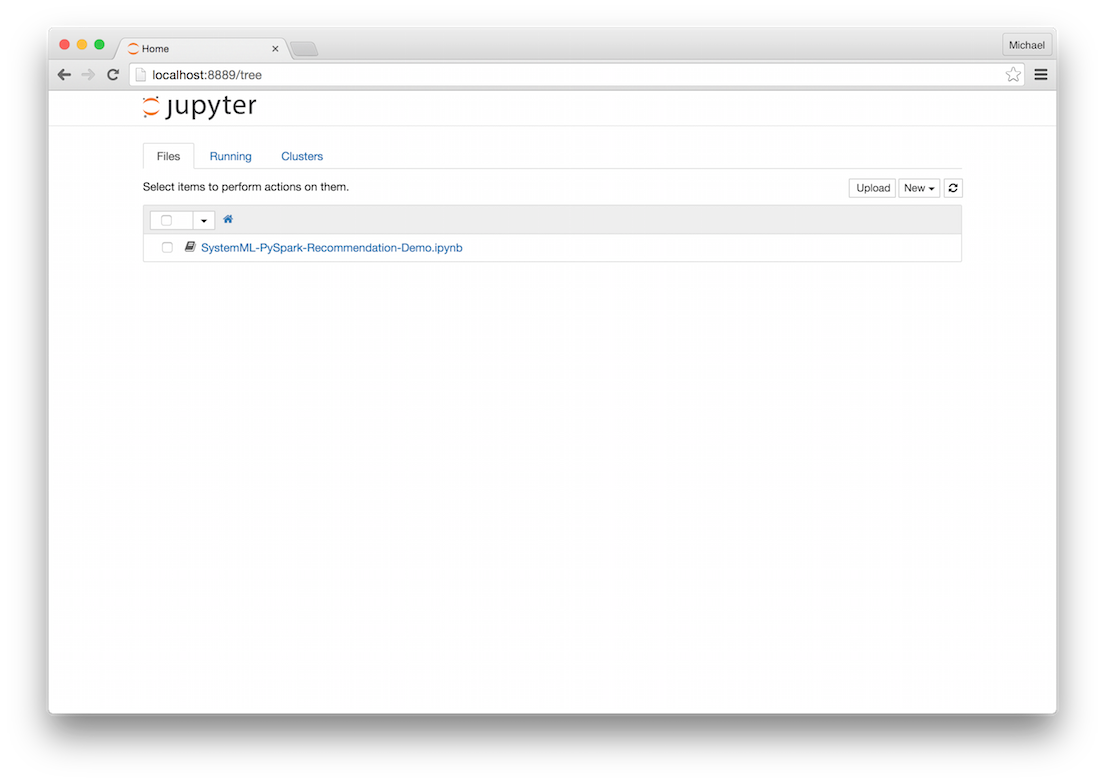
We can then open up the `SystemML-PySpark-Recommendation-Demo` notebook.
## Set up the notebook and download the data
{% highlight python %}
%load_ext autoreload
%autoreload 2
%matplotlib inline
import numpy as np
import matplotlib.pyplot as plt
from systemml import MLContext, dml # pip install systeml
plt.rcParams['figure.figsize'] = (10, 6)
{% endhighlight %}
{% highlight python %}
%%sh
# Download dataset
curl -O http://snap.stanford.edu/data/amazon0601.txt.gz
gunzip amazon0601.txt.gz
{% endhighlight %}
## Use PySpark to load the data in as a Spark DataFrame
{% highlight python %}
# Load data
import pyspark.sql.functions as F
dataPath = "amazon0601.txt"
X_train = (sc.textFile(dataPath)
.filter(lambda l: not l.startswith("#"))
.map(lambda l: l.split("\t"))
.map(lambda prods: (int(prods[0]), int(prods[1]), 1.0))
.toDF(("prod_i", "prod_j", "x_ij"))
.filter("prod_i < 500 AND prod_j < 500") # Filter for memory constraints
.cache())
max_prod_i = X_train.select(F.max("prod_i")).first()[0]
max_prod_j = X_train.select(F.max("prod_j")).first()[0]
numProducts = max(max_prod_i, max_prod_j) + 1 # 0-based indexing
print("Total number of products: {}".format(numProducts))
{% endhighlight %}
## Create a SystemML MLContext object
{% highlight python %}
# Create SystemML MLContext
ml = MLContext(sc)
{% endhighlight %}
## Define a kernel for Poisson nonnegative matrix factorization (PNMF) in DML
{% highlight python %}
# Define PNMF kernel in SystemML's DSL using the R-like syntax for PNMF
pnmf = """
# data & args
X = X+1 # change product IDs to be 1-based, rather than 0-based
V = table(X[,1], X[,2])
size = ifdef($size, -1)
if(size > -1) {
V = V[1:size,1:size]
}
n = nrow(V)
m = ncol(V)
range = 0.01
W = Rand(rows=n, cols=rank, min=0, max=range, pdf="uniform")
H = Rand(rows=rank, cols=m, min=0, max=range, pdf="uniform")
losses = matrix(0, rows=max_iter, cols=1)
# run PNMF
i=1
while(i <= max_iter) {
# update params
H = (H * (t(W) %*% (V/(W%*%H))))/t(colSums(W))
W = (W * ((V/(W%*%H)) %*% t(H)))/t(rowSums(H))
# compute loss
losses[i,] = -1 * (sum(V*log(W%*%H)) - as.scalar(colSums(W)%*%rowSums(H)))
i = i + 1;
}
"""
{% endhighlight %}
## Execute the algorithm
{% highlight python %}
# Run the PNMF script on SystemML with Spark
script = dml(pnmf).input(X=X_train, max_iter=100, rank=10).output("W", "H", "losses")
W, H, losses = ml.execute(script).get("W", "H", "losses")
{% endhighlight %}
## Retrieve the losses during training and plot them
{% highlight python %}
# Plot training loss over time
xy = losses.toDF().sort("__INDEX").map(lambda r: (r[0], r[1])).collect()
x, y = zip(*xy)
plt.plot(x, y)
plt.xlabel('Iteration')
plt.ylabel('Loss')
plt.title('PNMF Training Loss')
{% endhighlight %}
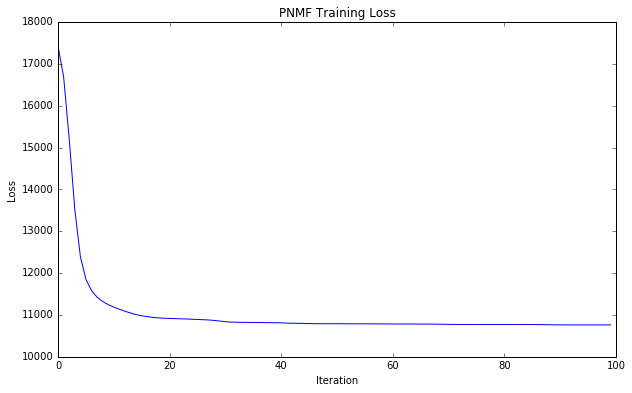
---
# Recommended Spark Configuration Settings
For best performance, we recommend setting the following configuration value when running SystemML with Spark:
`--conf spark.driver.maxResultSize=0`.